As much as I absolutely adore Project Life - the system, the cards, the designs! - I have accepted that it’s just not going to work for our family this year. SOB! Even using the app involves too many steps for the first 3 months of the year, as I’m currently using an Android phone on which I detest the camera, and using my iPad for the app involves the computer and Dropbox and too many steps that I know I would just avoid having to deal with. So, I did some research, and decided that a photo book was the way to go. Specifically, using the Blurb BookSmart software to do so, as I can work on it throughout the year and then just print at the end.
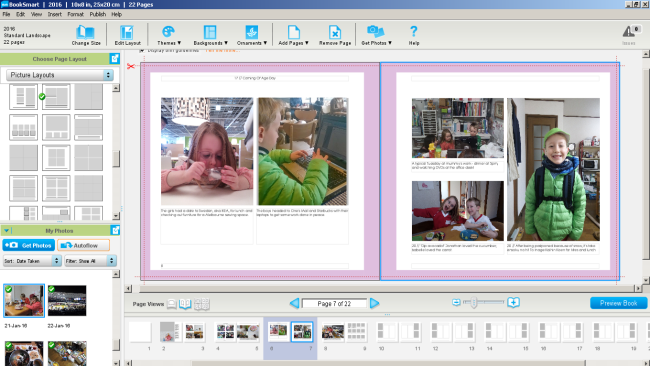
What I love about it:
- The ability to set a certain project to open immediately when you open the program - whenever I click on the Blurb icon, it opens straight up to the latest page edited in my photo book!
- Various in-built page templates that allow flexibility depending on how many photos you want to use, and/or what orientation they are. You can also set the default page background colour - for me, that’s white.
- The ability to design your own page templates and save them to reuse throughout your project.
- Edit the default stylesheet of fonts, including the font, size, bold/italic/etc.
- When you upload a photo, it names it by the date it was taken! Makes it so much easier to organise and edit the pages! It also adds a green tick to the image in the import folder when you’ve added it to the book so that you know for sure it’s been included.
I’m not doing a daily photo - I try to, but I don’t force it if there’s nothing in particular to document. And if there’s an event that is particularly special, then I dedicate a page to it. I’m trying to keep it to a double page spread per week on average, but if it goes slightly under or over, then that’s ok. As for pricing, well, once you take into account an album or two for Project Life, plus cards and photo printing, it’s definitely a much cheaper option! And it takes up less space when you move countries, and then interstate, during the year. And if I want to, I can always insert some Project Life app pages further down the road (once I return to an iPhone in Australia) as a full page photo in the book.

Living in Japan, Alyce spends her days mothering 2 little monkeys, quilting, blogging at Blossom Heart Quilts, and revelling in the fabrics of Japan!






 Crochet Along: Let's Start!
 Crochet Along: How to Change Colours
 DIY: Sewing Machine Extension Table

[…] when back in Australia, as it’s easier to do it from there than here in Japan. As I’m digitally documenting 2016, I don’t need so […]